

In the fast-paced universe of modern technology, it’s easy to assume we’ve got a handle on things. You read the manual, follow the updates, and maybe even skim through a few forums when you feel adventurous. But what if I told you there are hidden features, overlooked settings, and downright wrong usages of technology that could change your digital life? Let’s dive into those “aha” moments when we realize the tech gods might have been laughing at us all along.
1. When Subjecting Your Phone Battery To Extremes
Did you know that your phone’s battery is silently judging you when you let it drop to zero or keep it at one hundred percent all the time? It turns out, lithium-ion batteries, those tiny powerhouses inside your smartphone, prefer a more balanced approach. According to a study by Battery University, keeping your battery between 20% and 80% can significantly extend its lifespan. So, while you might think you’re doing a good deed by keeping your device fully charged or pushing it to its limits, you’re actually causing more harm than good. Next time, maybe cut your phone some slack and let it chill in the middle range.
Another thing that sends your battery into a silent rage is extreme temperatures. Whether it’s the heat of summer or the chill of winter, these conditions can drain your battery faster than you’d think. Keep your phone out of direct sunlight or those freezing pockets, and you’ll notice the difference in battery life. And sure, it might seem like a tiny detail, but these small changes can have a big impact. So, respect the battery gods, and they’ll reward you with a longer-lasting charge.
2. When Using The Tricky ‘Close All’ Button

You’ve probably been told that closing all your apps is the golden rule of saving battery life. You swipe up, close everything, and feel a sense of accomplishment. But surprisingly, doing this can actually work against you. Your phone’s operating system is smarter than you think and is designed to manage background tasks efficiently. Constantly closing apps and reopening them actually uses more battery power because your phone has to reload everything from scratch.
This also means your apps take longer to start up, and you might experience slower performance. The system is built to keep certain apps running in the background to make multitasking seamless, and closing them disrupts this balance. So, next time you feel the urge to swipe away all those tiny app windows, remember that less is sometimes more. Trust your phone’s intelligence; it’s got your back more than you realize.
3. When Ignoring The Software Update Nudge

How many times have you hit “remind me later” on a software update notification? It’s easy to do without thinking, but you might be missing out on more than just new emojis. Regular updates often include critical security patches that protect your device from emerging threats. According to cybersecurity expert Lisa Hall from TechGuard, skipping these updates can leave your device vulnerable to hackers and malware. It turns out those notifications are more than just a mild inconvenience—they’re a digital lifeline.
Ignoring updates might also mean missing out on performance improvements and new features. Sometimes, updates bring efficiency tweaks that make your device run smoother and faster than before. Of course, there are also the occasional tweaks to user interfaces that can enhance your overall experience. So, when you see that update notification pop up again, maybe give it the attention it deserves. Your device—and your data—will thank you.
4. When The Bluetooth Battery Mysteriously Drains

Bluetooth technology is one of those things we expect to work seamlessly in the background. But what if your Bluetooth is secretly sipping away at your battery life, even when you’re not using it? Many people leave Bluetooth on because, well, who wants to manually connect to their headphones every time? However, leaving it on all day can lead to unnecessary battery drain, even if it’s just scanning for devices you’re not using. Next time you pop those earbuds out, consider switching Bluetooth off when it’s not needed.
Another sneaky trick is to disable Bluetooth on devices that don’t need constant syncing, like your car’s infotainment system when you’re not driving. This small adjustment can save you from that dreaded low battery notification halfway through your day. Think of it as giving your phone a break from working overtime. As a bonus, you’ll also minimize the risk of unwanted connections or privacy breaches. So, all in all, turning Bluetooth off every now and then might just be worth the extra tap.
5. When The Cloud Reveals Its Full Capabilities

Cloud storage services are often seen as a convenient way to back up photos, videos, and documents. While this is entirely true, many people don’t realize the full potential of cloud technology beyond simple storage. The cloud also offers enhanced data sharing, real-time collaboration tools, and automated workflows that can drastically improve productivity. According to a study by IDC, businesses that fully utilize cloud capabilities experience a 30% increase in operational efficiency. So, if you’re only using the cloud to stash files, you’re missing out on its transformative benefits.
One major advantage of the cloud is the ability to access your data from anywhere on any device, making remote work and on-the-go productivity a breeze. Every file you save is instantly available on your phone, tablet, or computer, without the need for physical storage devices. Plus, it offers a level of data protection through redundancy that traditional storage can’t match. So, next time you think of the cloud as just a digital filing cabinet, remember that it’s so much more. Embrace the cloud’s full potential, and you’ll wonder how you ever lived without it.
6. When You Realize Wi-Fi Names Are More Than Just Fun
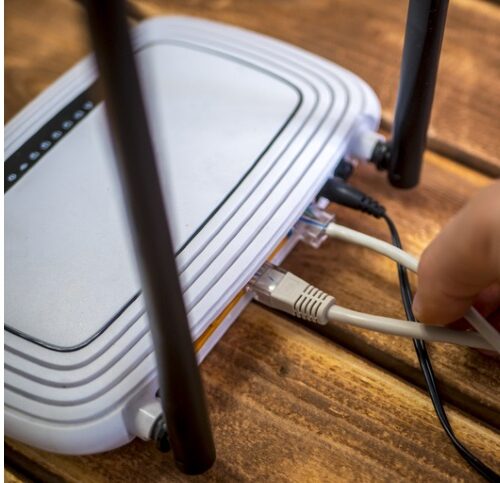
Naming your Wi-Fi network something clever or funny can seem like a harmless way to inject a little personality into your home. But did you know that your quirky Wi-Fi name can actually serve a more functional purpose? Using unique and complex Wi-Fi names can add an extra layer of security to your network by making it less appealing to hackers. If your network’s name is generic like “Linksys” or “Netgear,” it’s easier for someone to guess your default router settings. So, while “FBI Surveillance Van” might be a joke, a unique name can genuinely make your network less of a target.
Beyond security, a good Wi-Fi name can help you manage multiple networks more efficiently. If you live in an area with lots of networks, having a distinct name can make it easier to find yours in a crowded list. This is especially useful in large households or apartment buildings. Additionally, giving your network a professional or easily identifiable name can make it easier for guests to connect. So, go ahead and have fun with your Wi-Fi name, but remember to keep it unique and secure.
7. When Location Services Reveal Their Hidden Toll

Location services are incredibly convenient for everything from navigation to finding the nearest coffee shop. However, what many people don’t realize is that leaving location services on all the time can significantly impact battery life and privacy. A study by Cambridge University’s Department of Computer Science highlights that constant background location tracking can reduce battery life by up to 30%. Not to mention, it could mean your data is being shared more widely than you’d like. So, it might be time to rethink your settings when you don’t need turn-by-turn directions.
Moreover, leaving location services on for all apps can lead to unnecessary data usage and potential privacy concerns. Some apps track your location even when you’re not using them, gathering data on your movements and habits. Managing these settings carefully can help protect your privacy and extend your device’s battery life. You can choose to enable location services only when an app is in use or simply turn it on for specific apps you trust. By taking control, you ensure technology is working for you—not the other way around.
8. When You Realize The Screen Saver Is A Myth

Remember when screen savers were all the rage, and you’d sit and watch those flying toasters for hours? Well, it turns out that screen savers are kind of pointless in today’s world of LCD and LED screens. Originally designed to prevent burn-in on old CRT monitors, screen savers now only serve as a nostalgic throwback. Modern screens don’t suffer from the same burn-in issues, and a blank screen saves more energy than any moving image ever could. So, while it may be fun to stare at digital fish swimming around, you’re better off just letting your screen go dark.
In fact, disabling your screen saver and setting your monitor to turn off automatically can save you a noticeable amount on your energy bill. It’s a simple change that can make a big difference over time. Plus, with the rise of minimalism in design, a blank or black screen is far more in vogue. If you’re really itching for some movement, maybe consider a dynamic desktop wallpaper that only runs when you’re active. So, go ahead and retire those flying toasters—they’ve done their job well.
9. When You Master Keyboard Shortcuts

You might think keyboard shortcuts are the domain of tech wizards and office power users, but they’re actually a practical tool for everyone. By learning just a few key combinations, you can drastically speed up your computer navigation and workload efficiency. For example, simple shortcuts like Ctrl+C and Ctrl+V for copy and paste are just the beginning. There are shortcuts for nearly every action, like opening new tabs, switching between programs, or even taking screenshots. Spending a little time to learn these shortcuts can save you countless hours in the long run.
Moreover, customizing your own shortcuts can tailor your workflow to suit your needs perfectly. Many software applications allow you to assign keyboard shortcuts to specific functions that you use frequently. This can help reduce the need for repetitive mouse movements, which can be a lifesaver for your wrist and hand health. Plus, mastering shortcuts can add a sense of professionalism to your computer use, impressing colleagues with your digital dexterity. So, don’t shy away from shortcuts—they’re the secret sauce to efficient and enjoyable computing.
10. When You Overlook The Power Of Dark Mode

Dark mode is more than just a trendy aesthetic choice; it’s a practical feature that can enhance your digital experience. Switching your apps and devices to dark mode can reduce eye strain, especially in low-light environments. Many people don’t realize that dark mode can also save battery life on devices with OLED screens, where pixels are turned off to create deep blacks. This results in less power consumption, allowing you to extend the time between charges. So, next time you’re squinting at a bright white screen, consider giving your eyes and battery a break.
Besides its functional benefits, dark mode can also lend a sleek and modern look to your digital interfaces. It’s a simple way to refresh the appearance of your favorite apps and platforms without any extra cost. With more and more applications offering dark mode options, it’s easier than ever to make the switch. Plus, for those who work late into the night, dark mode can help minimize disruption to your sleep cycle caused by blue light exposure. So, embrace the darkness and enjoy the practical perks it brings.
11. When You Realize Printer Settings Can Save Trees

Printers often seem like ancient technology in a world of digital everything, but they’re still necessary for many. However, most people don’t take advantage of the eco-friendly settings built into modern printers. By selecting options like double-sided printing, grayscale mode, or draft quality, you can significantly reduce both ink and paper usage. These settings might not be the default, so you’ll need to adjust them manually, but the positive environmental impact is worth the effort. Plus, with the rising costs of ink, it’s also a savvy move for your wallet.
Additionally, many printers offer digital document storage and sharing options that can further minimize the need for physical prints. By opting for electronic distribution of documents whenever possible, you reduce waste and simplify your life. And with cloud-based platforms becoming more integrated, accessing and sharing digital copies is easier than ever. So next time you hit “print,” take a moment to consider the eco-friendly options available. Your planet—and your budget—will thank you.
12. When You Work Out, Gaming Consoles Are Media Hubs

Gaming consoles have come a long way since the days of pong and pixelated adventures. While many people still see them as limited to gaming, consoles like the PlayStation and Xbox have evolved into full-fledged media hubs. They offer streaming services, social media access, and even web browsing, all from your comfy couch. If you’re not using your console for more than just gaming, you’re missing out on a wide array of entertainment options. With apps for Netflix, Spotify, and more, your console can be the ultimate home entertainment center.
Moreover, these consoles often come with features like voice control, making it easier to find content without fumbling for remotes. Some even support smart home integration, allowing you to control lights and other devices with a simple voice command. By exploring beyond traditional gaming, you can unlock a world of possibilities and maximize the value of your console. So, embrace your console’s full potential and watch as it becomes an indispensable part of your entertainment ecosystem. It’s time to see it as more than just a gaming machine.
13. When You Get Clued Up On Voice Assistants
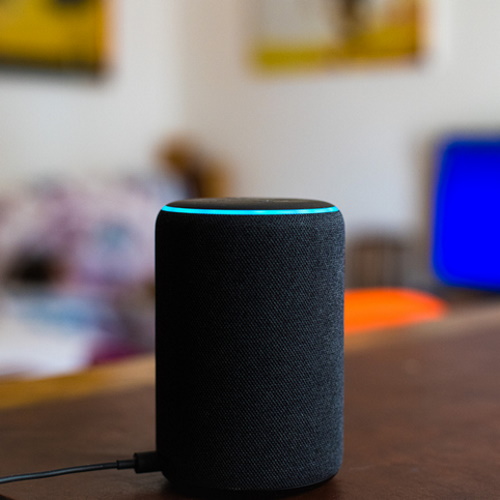
Voice assistants have quickly become household staples, but many people only scratch the surface of their capabilities. Sure, setting timers and playing music are handy, but these digital helpers can do so much more. From managing your calendar to controlling smart home devices, voice assistants like Alexa and Google Assistant can streamline your daily routine. With the ability to create shopping lists, send messages, and even check traffic, they can save you time and effort. So, if you’re only using your voice assistant for basic tasks, you’re missing out on its full potential.
Additionally, these assistants are constantly being updated with new skills and features, expanding their usefulness. You can even customize them to suit your personal preferences and lifestyle, making them more responsive to your needs. And with integration across multiple devices, they’re with you wherever you go. By taking the time to explore and utilize the full range of capabilities, your voice assistant can become an indispensable part of your daily life. So, start a conversation with your digital helper—you might be surprised at how much it can do.
14. When You Lean Into The Power Of Browser Extensions

Web browsers are our gateways to the internet, but many people don’t realize the full potential of browser extensions. These small plug-ins can enhance your browsing experience by adding functionality, improving security, and boosting productivity. From ad blockers to password managers, there’s an extension for just about everything. People are often amazed at how much more efficient their online activities become with the right set of tools. So, if your browser is looking a little bare, it might be time to explore the world of extensions.
Moreover, extensions can help personalize your web experience to better suit your needs and preferences. Whether you want to focus better with a distraction-blocking tool or keep your data safe with a privacy extension, the options are endless. And with the ability to sync across devices, your tailored browser experience follows you wherever you go. Taking advantage of these tools can save you time, reduce your digital stress, and make your online activities more enjoyable. So, give your browser a makeover and see how much more it can offer you.


